 MinutesKept
IEP Service Minutes Log: 4 Things Your Record Needs

Short answer: A useful IEP service minutes log shows, for every service and week, minutes promised and delivered, no-school weeks, and what you asked the school. Scattered notes usually miss at least two of these.
MinutesKept is a simple phone tool for parents of children with an IEP. Once a week, the parent answers one question per service, and MinutesKept shows the minutes promised, received and missing. Organize and document. Not legal advice.
You already keep notes, and that's a real start.
Now picture the annual review. Someone asks, "When exactly were sessions missed?" You scroll a chat thread, a notes app and a photo of a sticky note. The moment passes.
What usually goes wrong is the format. Notes written on different days, in different apps, can't answer a question about dates.
What should an IEP service minutes log include?
Check whatever you use today (notebook, notes app, spreadsheet, calendar) against these four points.
1. Promised minutes, per service, written once
The IEP must state how often, where and how long each service happens (34 CFR 300.320). "Speech 30 min x 2 per week" turns into 60 minutes a week. Without that baseline, a note like "only one session" has nothing to be measured against.
Notes app: usually no. Weekly record: yes.
2. Delivered minutes, every week, with a date
"I think October was bad" isn't a record. "Week of Sep 14, speech 30 of 60" is.
Notes app: sometimes, when you remember. Weekly record: yes, one question per service.
3. No-school weeks, marked as no school
Holidays and closures aren't missed sessions. If your record mixes them up, the totals look wrong and the conversation goes sideways.
Notes app: rarely. Weekly record: a "No school" answer that isn't counted.
4. What you asked, and when
"Asked for the service log, Sep 16." "Therapist offered a make-up, Oct 2." These dated lines show you followed up calmly.
Notes app: buried in email and chat. Weekly record: MinutesKept writes the request for you, and your sent email keeps its date.
Score your current system: 4 of 4, keep going. 2-3, you'll spend the night before the meeting filling gaps. 0-1, start a weekly record now.
See a record that passes all 4 →
Why do week-by-week numbers matter?
When services are missed, what gets discussed is the gap between what was promised and what was delivered. In a 2026 Connecticut complaint decision, the numbers were 239.4 hours required, 12.5 provided, and 226.9 hours of make-up ordered. (Connecticut decision 26-0550) Every case is different, and we can't say what applies to your child. Week-by-week numbers still beat memory.
How MinutesKept passes the test in about 10 seconds a week
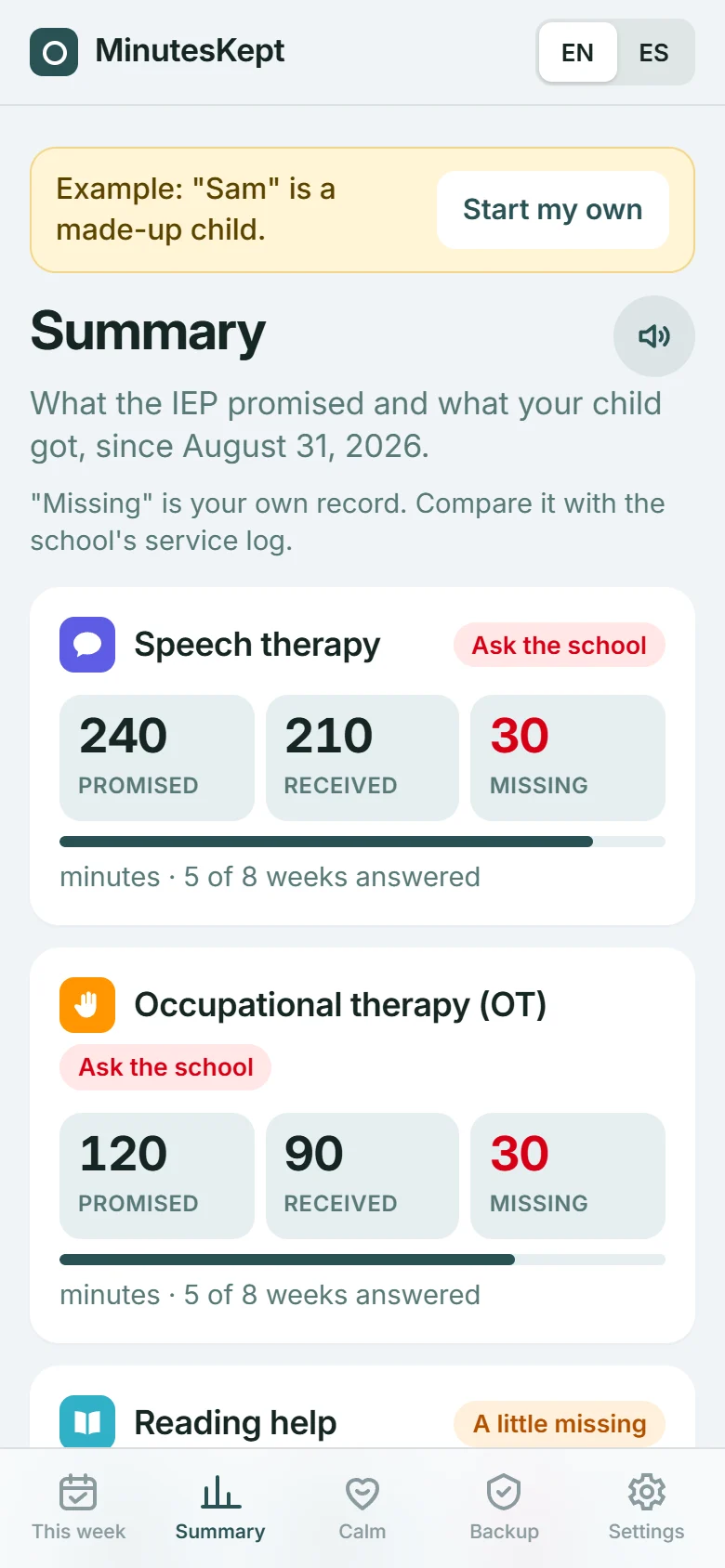
We built MinutesKept around these four points:
- Promised: tap in each service once (about 2 minutes, no typing).
- Delivered: each week, one question per service: Yes, Only some, No, or No school. Tap it, say it or type it.
- No school: marked and left out of the totals.
- Asked: a ready email requesting the school's service log; your sent email keeps its date.
Then it does the math: promised vs received vs missing, with a plain status for each service, and a one-page summary to print for the meeting.
Example only: an illustrative parent story, not a real customer. A parent logs speech and OT for six weeks. In week two, speech shows 30 of 60 minutes, with the reason "Therapist was absent." She taps "Ask the school," compares the log, and the therapist offers a make-up session. At the meeting, she shows one page instead of explaining from memory.
Not an IEP family? It also works for a 504 plan with services, early intervention (IFSP), private therapy or tutoring: if sessions are promised each week or month, you can track them under your own service name.
Notes app, spreadsheet or MinutesKept: which one fits?
| Notes app / notebook | Spreadsheet | MinutesKept | |
|---|---|---|---|
| Promised minutes baseline | Rarely | Yes, if you build it | Yes |
| Weekly check-in time | Varies | A few minutes | About 10 seconds |
| No-school weeks handled | Rarely | Manual | Yes |
| Ready email for the service log | No | No | Yes |
| Works by voice, EN/ES | Depends | No | Yes |
| Cost | Free | Free | $19 one-time (founding) |
Paper and spreadsheets can pass the test too if you keep them up. MinutesKept is for parents who want it done on the phone in seconds.
Founding families
MinutesKept is open to its first 100 founding families at $19 one-time, with a 14-day money-back guarantee (offer ends at 100 families or on December 31, 2026). Checkout is open now (secure checkout by Gumroad); your license key arrives by email right away.
Questions parents ask
What is an IEP service minutes log?
A week-by-week record of each service in the IEP: the minutes promised, the minutes your child actually got, and the weeks with no school. It turns "I think sessions were missed" into specific dates.
How do I track IEP service minutes?
Write each service from the IEP once, with its minutes. Then, once a week, note whether each one happened: all, some, none, or no school. Paper works; a phone tool does the math for you.
Do no-school weeks count as missed minutes?
Mark them separately. Holidays and closures are not missed sessions, and mixing them in makes the totals look wrong.
Can I ask the school for its service log?
Yes. Parents can review their child's education records, and the school should respond before any IEP meeting and within 45 days (34 CFR 300.613).
Is this legal advice?
No. MinutesKept helps you organize and document. For help with your rights, contact your state's Parent Training and Information Center.
Organize and document. Not legal advice. Sample data and the example story are illustrative. Results vary by school and situation.