
MinutesKept
For parents of children with an IEP

Thirty minutes a week, promised. Did it happen?

Check that your child gets every therapy minute the IEP promises. Tap once a week on your phone.

Founding price for the first 100 families or until December 31, 2026, then $29, later $59.99. $19 once is less than 40¢ a week for a year.

🔒 Your record is saved on your phone, not online. Save a backup file regularly in the Backup tab.

No child name or IEP neededWorks on any phoneEnglish & Español14-day money-back
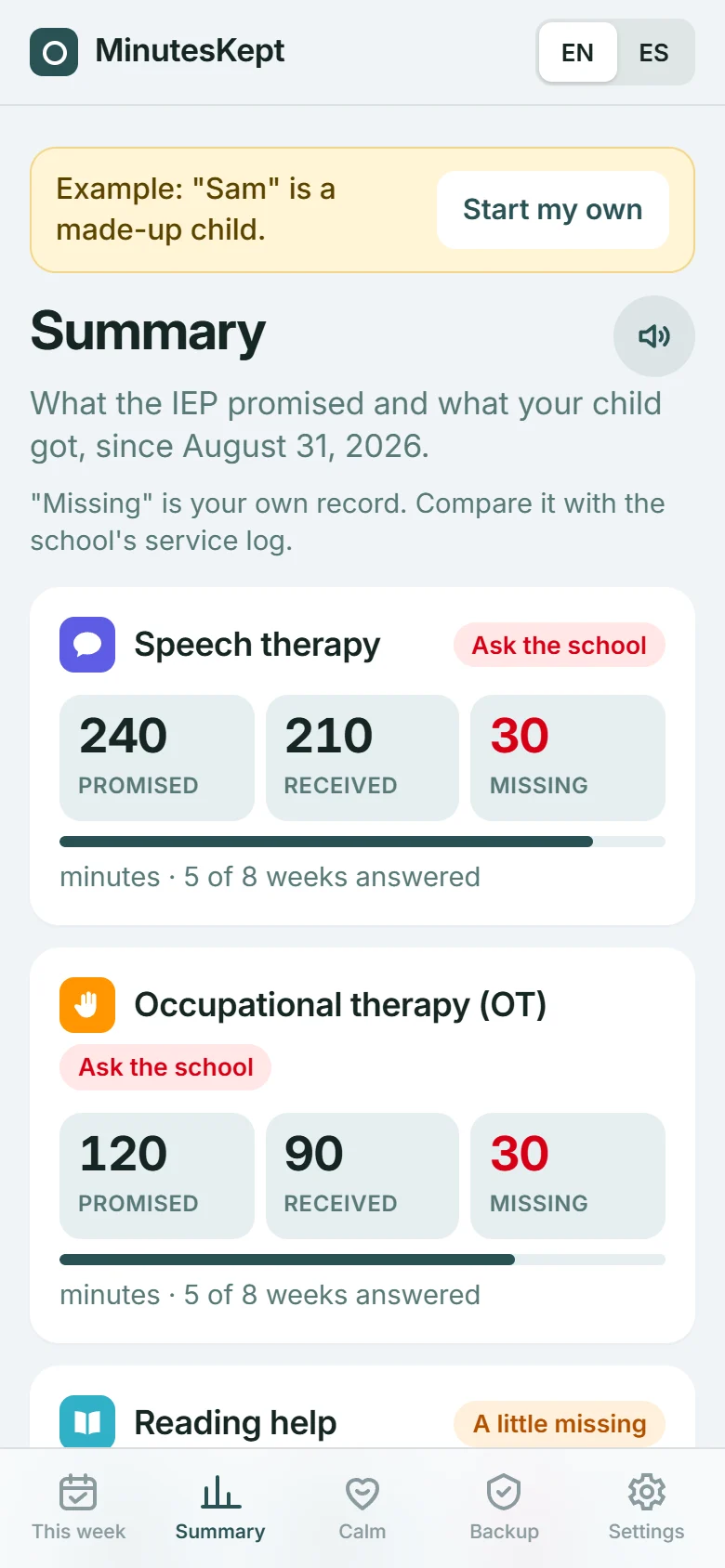
MinutesKept Summary screen: speech therapy 240 minutes promised, 210 received, 30 missing, for a made-up sample child named Sam

The real tool, with "Sam", a made-up sample child. Try the example free →

If a session is missed, will you know?

By the annual review, it's your memory against a schedule. A weekly record beats memory. Track it weekly, bring it to every meeting.

You knew something was missing. Now you can show it.

“Our records show all sessions were delivered.”

You're almost sure that's not right. Speech was cancelled at least twice in September. Maybe three times. But you can't say which weeks, so you nod, and the meeting moves on. On the drive home it replays: why didn't I write it down?

You're not careless. You're keeping track of everything else: the appointments, the forms, the phone calls, the meltdowns after a hard day. So make this one thing small. Tap one answer per service each week, about 10 seconds. Next time, you bring one page with dates on it, and the conversation starts from facts.

What carries you isn't the system. It's love, the belief that your child can grow, the effort you put in every day, and hope. One week at a time.

An illustration put together from what parents have shared. Not a real person. Read the whole story →

Track the minutes, not your child.

We never ask for your child's name, birth date, school or IEP document. You enter only the services and minutes the IEP promises, and your record stays on your phone. No IEP upload. Ever.

Who is MinutesKept for?

Made first for US families with an IEP. The counting works for any weekly or monthly plan.

Parents and caregivers of a child with an IEP

Speech, OT, PT, counseling, reading or math help, behavior support: any service with minutes per week or per month.

Grandparents, foster parents and co-parents

Whoever keeps the record. Share the summary with the rest of the family in one tap.

Families without an IEP, or outside the US

A 504 plan with services, early intervention (IFSP), private speech or OT, tutoring: if sessions are promised each week or month, track them under your own service name. The tool's words talk about the IEP.

Not for

Legal advice, reviewing the IEP document, or school staff logging a caseload. MinutesKept is your own record, kept by you.

How MinutesKept helps, in five pictures

Thirty minutes promised. About 10 seconds to check.

A school services page on a kitchen table, one line circled in pencil

Thirty minutes a week, promised.

Did it happen?

A tired mother checks her phone at the kitchen table in the evening, school folders beside her

By the IEP meeting, it's your memory

against their schedule.

A parent's hand holds a phone showing the MinutesKept weekly question

One question a week.

About 10 seconds.

The same mother, smiling in morning light, hugs her son; one printed summary page on the table

Walk in prepared.

Every minute on one page.

The MinutesKept summary screen on a phone

$19 once · 14-day money-back.

No child's name. No IEP upload.

Get MinutesKept

1 of 5

Get MinutesKept · $19

One-time · 14-day money-back · No child's name

How does MinutesKept work?

Three simple habits. No spreadsheets, no typing.

Once · about 2 minutes

Tap in the IEP promises

Each service, how many minutes and how often. Nothing is chosen for you.

Every week · about 10 seconds

Answer one question per service

Yes, Only some, No, or No school. Tap it, say it or type it.

Any time

See what's missing

Minutes promised, received and missing, then ask the school with one tap.

What do you get with MinutesKept?

Everything here is in the tool today.

IEP promises

Every service with its minutes and how often, in one list.

Weekly check-in

One question per service, about 10 seconds. Change any past answer later.

Minutes summary

Promised vs received for each service, with what's missing and a plain status.

Ask the school

A polite email asking for the school's service log, already written for you.

No copying, week by week

Open Summary, pick the period (since your last IEP meeting, this school year, the last 3 months, or your own dates) and print one page: minutes promised, received and missing for every service.

Private backup

Your record stays on your phone. Save a backup file and open it on a new phone.

MinutesKept, a notebook or a spreadsheet: which works better?

Most parents start with notes or a spreadsheet. Here is what changes with MinutesKept.

Swipe to compare →

MinutesKept

Built for tracking IEP minutes

Know each week if each service happened
✓ About 10 seconds a week
Missing minutes added up for you
✓ By itself
One page for the IEP meeting
✓ Print or save as PDF
A ready email asking the school for its service log
✓ One tap
Fully in Spanish
✓ Every screen

Notes app or memory

What most parents do today

Know each week if each service happened
Only if you remember to write it down
Missing minutes added up for you
No
One page for the IEP meeting
Scattered notes
A ready email asking the school for its service log
You write it yourself
Fully in Spanish
You write it

Spreadsheet or paper log

Free templates and notebooks

Know each week if each service happened
Only if you log every session
Missing minutes added up for you
Only if you build the formulas
One page for the IEP meeting
You lay it out yourself
A ready email asking the school for its service log
You write it yourself
Fully in Spanish
You write it

Everything in MinutesKept

Available now

  • Weekly check-in: tap, say or type, about 10 seconds
  • Minutes promised, received and missing for every service
  • Week-by-week and month-by-month record; change any answer
  • One-page summary to print or save as PDF, or share
  • A ready email asking the school for its service log
  • A backup file you keep, and a weekly calendar reminder
  • English and Spanish, read aloud, bigger text
  • Try it first with Sam, a made-up example child: a 3-step guided example
  • Pick the period for the summary (since the last IEP meeting, this school year, the last 3 months, your own dates)
  • Calm Corner for kids and parents: free for 3 months for founding families, then part of the subscription
  • Free IEP meeting checklist (PDF)
  • Help by email: hello@minuteskept.com

Coming soon · included (10)

Tap to see the list ▾Tap to hide ▴
  • Key IEP dates and a short to-do before each meeting
  • More ready emails: reports before the meeting, make-up sessions, a recap after
  • Wins and incident notes
  • Simple goal progress
  • A log of calls and emails with the school
  • IEP News: government changes in plain words
  • Ask AI: a ready question for your own free AI assistant
  • AI help assistant in the tool, answering from our guides
  • More plain-language guides and FAQ answers with links to official sources
  • A list of IEP advocates who partner with us

Subscription · coming soon (6)

Tap to see the list ▾Tap to hide ▴
  • Online backup with an email code, no password
  • One record on two phones, for co-parents and grandparents
  • A folder for school papers, kept on your phone
  • Seasonal kits for the school year
  • AI helper, later, with clear limits (not legal advice)
  • MinutesKept Kids: picture schedules and stories, sold separately

Why no IEP upload or AI review of your IEP? Your child's IEP holds private health and school details. MinutesKept never asks for it, so we never hold it. For AI help, Ask AI and our help assistant (coming soon) work without it.

Legal questions? Our guides and FAQ give plain-language information, suggestions and next steps, with links to official sources. It is general information, not legal advice for your situation: for that, your free state Parent Center or an advocate can help.

Organize and document. Not legal advice.

The night before the meeting: one page, everything you logged.

You're not being difficult. You're being prepared.

  • Minutes promised, received and missing
  • Week-by-week answers, with dates
  • A ready email to ask for the service log
  • Saved on your phone; no child names needed
Free · 1-page PDF

IEP Meeting Prep Checklist

What to gather two weeks before, what to compare a week before, five calm questions for the meeting, and what to send the day after.

Blog & guides for parents

Short, practical reads. Organize and document. Not legal advice.

Questions parents ask

What are IEP service minutes?

IEP service minutes are the time an IEP says your child will receive each special-education or related service, such as 30 minutes of speech therapy twice a week. MinutesKept helps you log the minutes actually delivered and compare them with the minutes promised.

Is this legal advice?

No. MinutesKept helps you organize and document. For help with your rights, contact your state's free Parent Training and Information Center at parentcenterhub.org/find-your-center, or an advocate.

Where is my data stored?

On your own phone. We can't see it, and we never need your child's name. Because it lives only in this phone's browser, clearing the browser's data or changing phones deletes it unless you saved a backup file: saving one takes about 10 seconds. If you sign up on this page, your email is stored in our Cloudflare account and never sold. See the privacy policy.

Do you need my child's information?

No. We never ask for your child's name, birth date or student ID, and MinutesKept works fine without them.

Do I have to write everything up before the meeting?

No. MinutesKept adds up your weekly answers. Open Summary, pick the period and print one page.

Do I need to install anything?

No. MinutesKept opens from a link on any phone or computer, like a website. You can add it to your home screen for one-tap access.

Is it hard to use?

No. You tap big buttons, one question at a time. You can also say or type your answer, and have any question read out loud.

Does it work in Spanish?

Yes. MinutesKept works in English and Spanish; you switch the language with one tap.

What if the school's service log is different from mine?

That's useful to learn. Your log is your own record; the school's log is theirs. Ask, compare the two calmly, and bring both to the next meeting.

When can I buy it, and what does it cost?

Founding families pay $19 one-time: the first 100 families, or until December 31, 2026, whichever comes first. Then $29, later $59.99. Full refund within 14 days of purchase (one refund per customer). Get it on the founding families page.

Walk in prepared.

Open now: founding price $19 one-time for the first 100 families · Works on any phone · 14-day money-back

Get MinutesKept