 MinutesKept
Digital IEP Binder and IEP Tracker: What Each One Does

Short answer: A digital IEP binder keeps your child's papers (the IEP, evaluations, meeting notes, emails) in organized folders on your phone or computer. An IEP tracker keeps a different record: whether the services the IEP promises actually happened each week. The binder holds what was written down. The tracker holds what took place. Most parents end up wanting both.
MinutesKept is a simple phone tool for parents of children with an IEP. Once a week, the parent answers one question per service, and MinutesKept shows the minutes promised, received and missing. Organize and document. Not legal advice.
You searched "IEP binder" because the paper is winning. Report cards in a bag, emails split across two inboxes, a meeting packet somewhere in the car.
A binder fixes that, and setting one up is an afternoon's work. What a binder can't tell you is whether the speech sessions happened this week. That needs a second record, and it's the one parents tend to find they're missing in the spring.
What is a digital IEP binder?
A digital IEP binder is the same filing system as the paper one, kept as photos, scans and files in folders you can open from your phone. Everything you'd put behind a tab goes into a folder with the same name.
The paper version has a well-known layout. Understood, a nonprofit for families of children who learn and think differently, describes a binder with six tabbed sections: Communication, Evaluations, IEP, Report cards/Progress notes, Sample work, and Behavior. Digital folders can copy that layout exactly.
What goes in an IEP binder?
Here is what Understood suggests for each section, in plain terms.
| Section | What goes in it |
|---|---|
| Communication | A log of meetings and calls, plus letters and important emails with the school |
| Evaluations | Your request for an evaluation, your consent, the school's report, and any private evaluation |
| IEP | A copy of your procedural safeguards, the IEP, the prior written notice for each IEP meeting, the school's meeting notes and your own |
| Report cards / Progress notes | Report cards and the progress updates on IEP goals |
| Sample work | Homework or classwork that shows progress or a concern, added at least monthly |
| Behavior | The school's code of conduct, any behavior plan, any disciplinary notices |
Two habits from the same guide are worth copying. Put the newest paper on top in each section. And when the IEP changes, file the new plan together with its prior written notice.
How do I set up a digital IEP binder for free?
You don't need a special app. A folder in the cloud storage you already use will do.
- Make one main folder in an account only you control. You don't need your child's full name in the title.
- Add six subfolders with the section names above.
- Photograph or scan each paper the day it arrives. Start every file name with the date, written year first: "2026-11-03 IEP meeting notes". Year-first dates sort themselves in order.
- Keep each prior written notice next to its IEP. The pair tells you what changed and when.
- Add one work sample a month. Pick the one that shows a win or a worry.
School records are sensitive, so protect the account with a strong password and two-step sign-in, and share the folder with no one you haven't chosen.
What is an IEP tracker?
An IEP tracker is a record of whether each service in the IEP happened, week by week: the minutes promised, the minutes received, and the dates of any misses.
The binder can hold the promise, say "speech-language, 30 minutes, 2 times a week." Nothing in a binder shows whether the sessions took place. The only way to know is to write it down as it happens, or to rebuild it later from memory, which is the weaker version.
The binder and the tracker also answer different questions:
| Question | Where the answer lives |
|---|---|
| What did the school agree to provide? | Binder (the IEP) |
| What did the evaluation find? | Binder (Evaluations) |
| What was said at the last meeting? | Binder (notes and emails) |
| Did the sessions happen this week? | Tracker |
| How many minutes are missing since October? | Tracker |
If the tracker shows a gap, the binder is where you go to check the exact wording of the service. If you want the arithmetic behind a missed-minutes number, here is how to count it.
Can I ask the school for my child's records?
Yes. Federal rules give parents the right to inspect and review their child's education records. Under 34 CFR 300.613, the school must comply "without unnecessary delay and before any meeting regarding an IEP," and in no case more than 45 days after the request. You can also ask for copies when not having them would effectively prevent you from reviewing the records.
Ask in writing. Email works, and it carries a date. File the email in your Communication folder.
Where MinutesKept fits
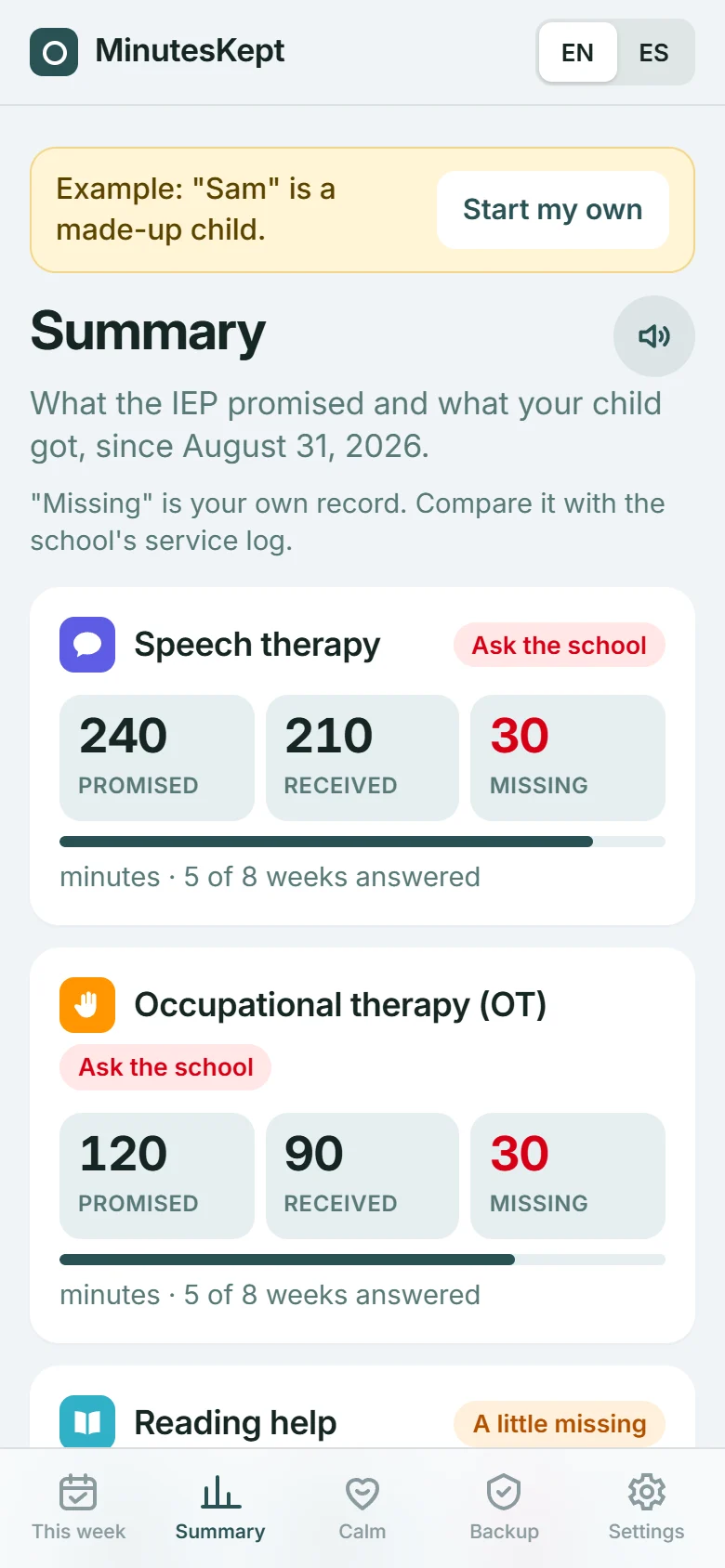
MinutesKept is the tracker half. It is a phone tool for the weekly record, and it does not store your IEP or any other document.
- Once, about 2 minutes: add each service from the IEP with its minutes, like speech 30 minutes, 2 times a week.
- Every week, about 10 seconds: one question per service. Tap "Yes, all of it", "Only some", "No, not at all" or "No school this week". Pick a reason for a miss, like "Therapist was absent". English or Spanish.
- Automatic: minutes promised, received and missing, week by week, with dates.
- When something's off: a ready email asking the school for its service log, and one page to bring to the meeting.
It never asks for your child's name, and you don't upload the IEP. Your record stays on your phone. Keep the papers in your own binder, paper or digital, and use MinutesKept for the weekly question.
Not an IEP family? The same two records work for a 504 plan with services, early intervention (IFSP), private therapy or tutoring. A folder for the papers, a weekly tap for the sessions.
See how it looks before you add anything of your own. Free, no sign-up, opens on any phone.
Try the free example (made-up child "Sam") →
Also worth reading: 5 signs your child is missing IEP minutes, the IEP minutes record test, and the night before the IEP meeting.
Questions parents ask
What is a digital IEP binder?
It is an IEP binder kept as photos, scans and files in folders on your phone or computer. It holds the same papers as a paper binder: the IEP, evaluations, meeting notes, progress reports, emails and work samples.
What should be in an IEP binder?
Understood suggests six sections: Communication, Evaluations, IEP, Report cards/Progress notes, Sample work and Behavior. File the newest paper on top in each section.
What is an IEP tracker?
It is a record of whether the services in the IEP happened, week by week. It shows minutes promised, minutes received and the dates of any misses, which a folder of documents can't show.
Is a paper binder or a digital one better?
Either works. The better one is the one you will keep up. Digital files are easy to search and share when you choose, and a paper binder needs no login. You can keep both.
Does MinutesKept store my child's IEP?
No. It never asks for your child's name and has no upload for the IEP. Your weekly record stays on your phone.
Can I use a tracker if my child doesn't have an IEP?
Yes. A 504 plan with services, early intervention, private therapy and tutoring all promise sessions on a schedule, and the same weekly record works for each.
Organize and document. Not legal advice. For free help with your rights, contact your state's Parent Training and Information Center.
Sources, opened November 3, 2026: Understood, "How to organize your child's IEP binder" (Amanda Morin, August 5, 2019); 34 CFR 300.613.